
Pay as you go From €15.99 + VAT per report →
Your Amazon VAT, by country and ready for your accountant
Upload the VAT transactions report Amazon gives you and get the quarter broken down: what goes on Form 303, what goes on the OSS return for each country and what Amazon has already collected. No spreadsheets.
- Every country in one report
- No subscription, no commitment
- Nothing to install
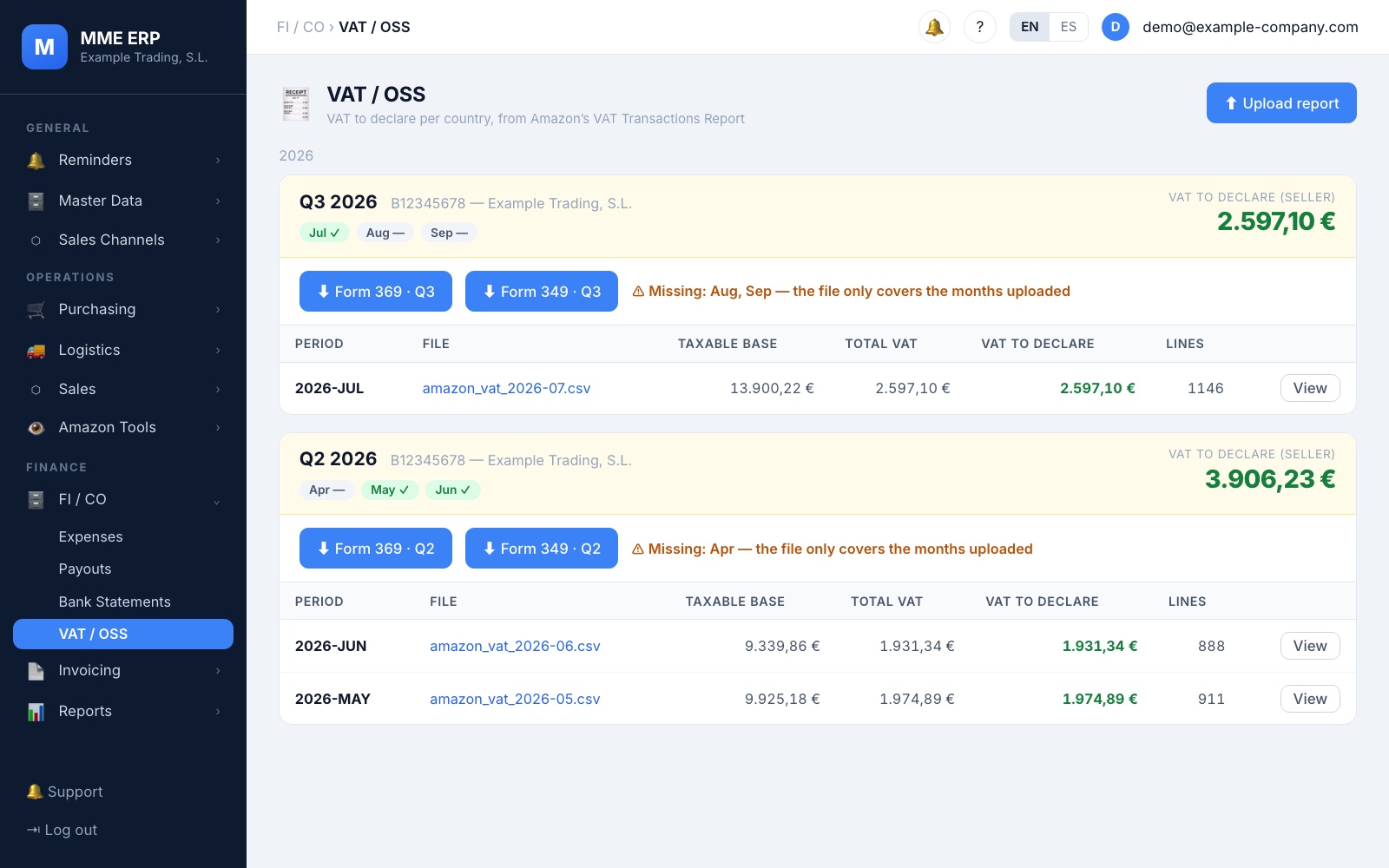
One quarter, every country
for a single credit
Form 369, prepared
for your accountant to file
You only pay when you use it
1 credit
= 1 quarter, with every country
€0
monthly fee: no subscription
Free
to reprocess the same quarter
24 months
to use your credits
What it does for you
What takes you a weekend today, done in minutes
Each marketplace on its own, what Amazon collects mixed up with what you declare… The report brings your sales from all over Europe together and sorts them by country, with the numbers reconciled.
Each country, separately
Germany, France, Italy… each with its own VAT rate, its taxable base and its number of sales, never mixed up.
Each sale, on its form
Domestic sales go on Form 303, sales to consumers in other countries on the OSS return and sales to EU businesses on Form 349.
What Amazon collects, kept apart
It separates the VAT Amazon already collects from the VAT you have to declare, so you know what’s yours.
Fixing it costs nothing
If you correct the file and reprocess the same quarter, you don’t spend another credit.
Inside
This is what your quarter looks like
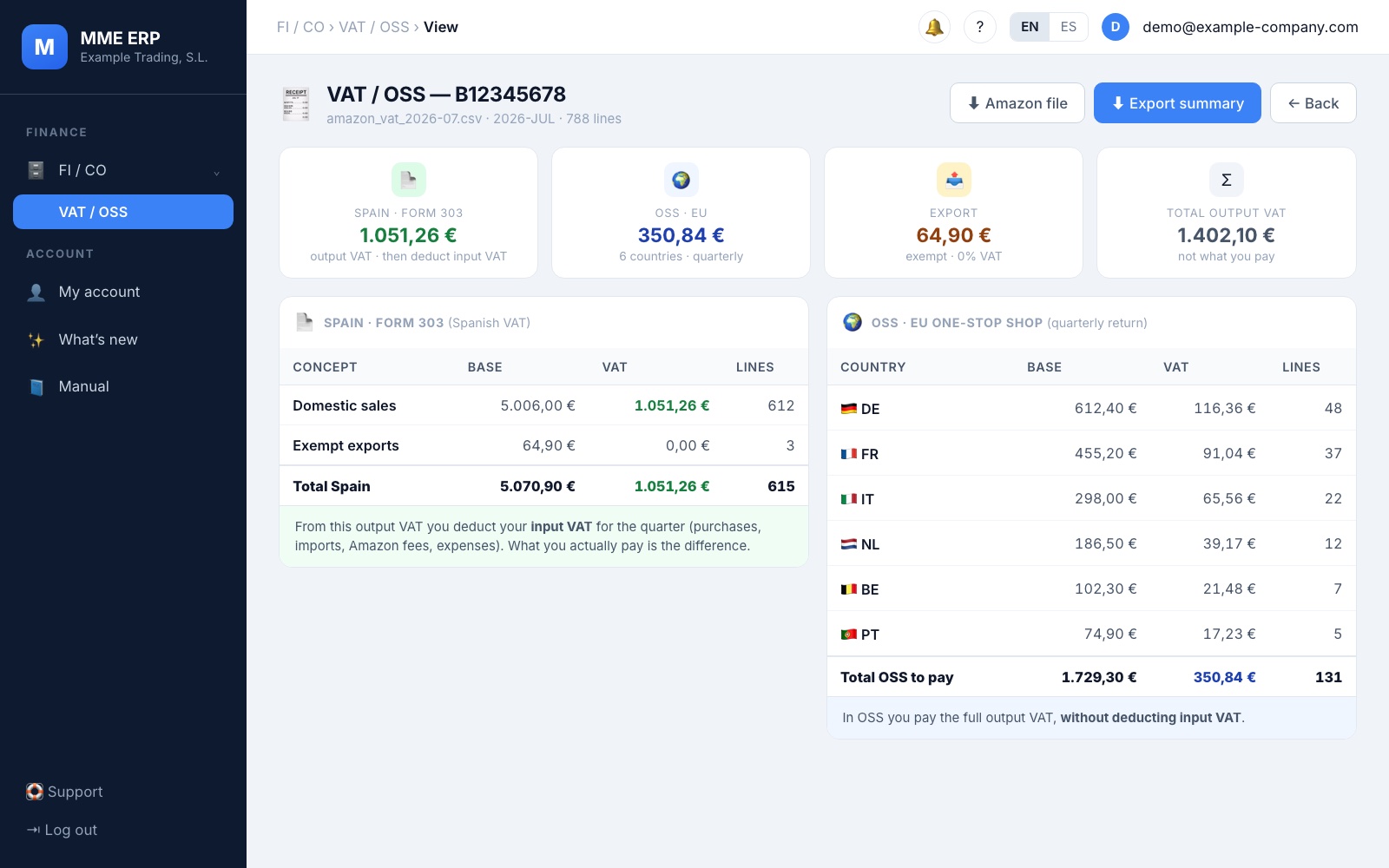
Each country’s VAT, never mixed up
The report separates your sales in Spain from those that go through the One-Stop Shop (OSS) and, within OSS, gives you the base and the VAT for each country. What you see is what gets declared.
- Sales in Spain, exports and OSS, each in its own table
- Base, VAT and number of sales for each country
- A summary to download in Excel and send to your accountant
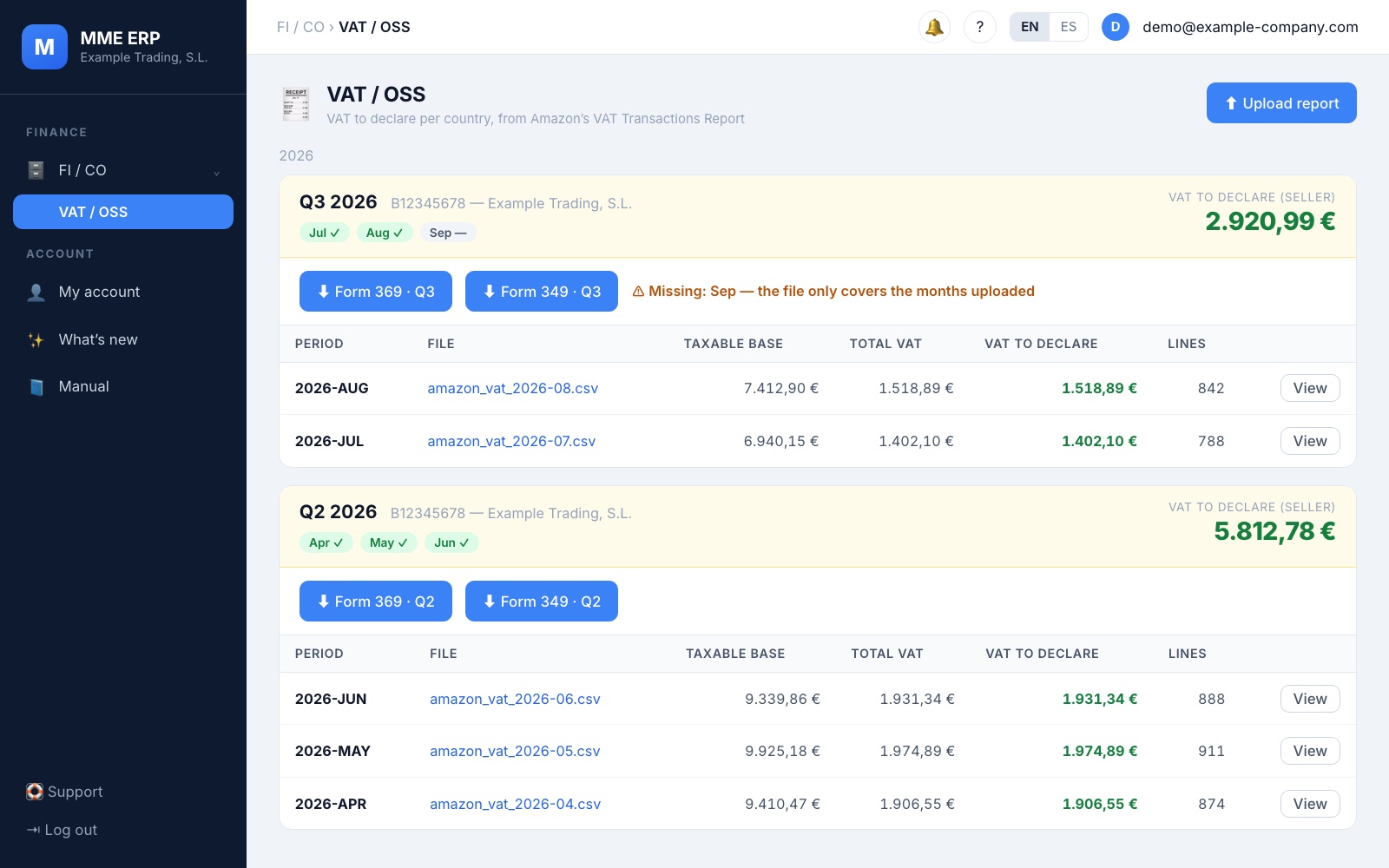
Forms 369 and 349, prepared
Upload one file per month and the system groups them by quarter. With one click you download the Form 369 (OSS) file and, if you have sold to businesses in other EU countries, the Form 349 file too.
- It warns you if a month of the quarter is missing
- Files in the format the Spanish Tax Agency requires, for your accountant to file
- Everything saved by quarter, to look up whenever you want
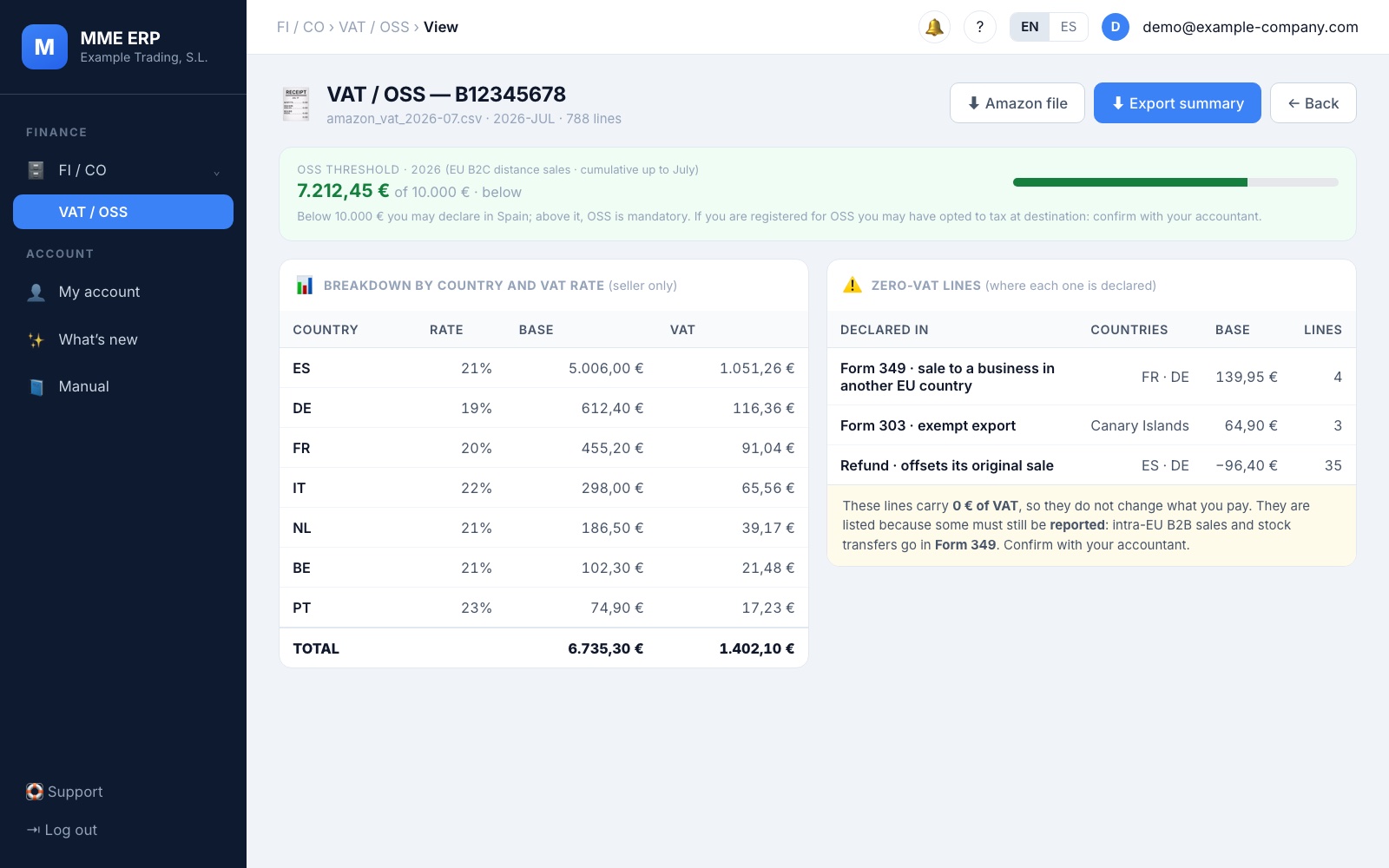
No surprises with the threshold or with zero-VAT sales
A bar shows how much you have sold this year to consumers in other EU countries against the €10,000 limit. And the sales that carry no VAT but still have to be declared are shown separately, each with the form it goes on.
- The €10,000 annual threshold, always in view
- Sales to EU businesses, exports and refunds, correctly classified
- Warnings written so that you can understand them
Credit packs
You buy reports, not subscriptions
Pay once and use the credits when each quarter comes round. No subscription and no commitment. All prices exclude VAT.
OSS 1
€15.99
+ VAT · launch price
For your first quarter.
- 1 quarterly report
- Every country included
Recommended
OSS 4
€49.99
+ VAT · launch price
Your full tax year: 4 quarters.
- 4 quarterly reports
- Works out at €12.50 per report
OSS 8
€89.99
+ VAT · launch price
Two full tax years.
- 8 quarterly reports
- Works out at €11.25 per report
All packs include
- 1 credit = 1 quarterly report, with every country
- VAT breakdown by country: OSS, intra-Community and domestic
- Separates what Amazon collects from what you declare
- Reprocessing the same quarter is free
- Credits expire after 24 months
- 1 user and email support
Credits are non-refundable. If you later sign up for the MME ERP, any credits you haven’t used are deducted from the plan at what you paid for them.
* Support tool for VAT-OSS compliance. This is not tax advice: review your data with your accountant before filing.
It’s that easy
How it works
1
Buy your pack
Pay once, no subscription. Sign the contract online in two minutes and your login arrives by email.
2
Upload the Amazon report
Download the VAT transactions report from Seller Central, one file per month, and upload it as it is.
3
Download and hand over
Check the breakdown and download the summary and the form files for your accountant.
Frequently asked questions
What do I need to get started?
The VAT transactions report Amazon gives you in Seller Central (one file per month, in CSV or Excel) and a credit pack. There’s nothing to install: it works in your browser.
How many credits does each report use?
One credit per quarter, with every country included. If you correct something and reprocess the same quarter, you don’t spend another one.
Do credits expire?
Yes, 24 months after you buy them: enough for two full tax years. If you run out of credits you lose nothing: your reports stay in your account to view and download.
Do you file the return for me?
No. We give you the report and the files, organised and reconciled; checking and filing them is up to you or your accountant. It’s a support tool, not tax advice.
What if I want the full ERP later on?
Switch whenever you like, without losing your data. Any credits you haven’t used are deducted from the plan at what you paid for them (free credits don’t count). In the MME ERP Pro and Premium plans the VAT-OSS report is already included, without spending credits.
Do the prices include VAT?
No. All prices exclude VAT: the applicable VAT is added to your invoice.
How do I buy it?
Very soon you’ll be able to buy your pack right here. Choose the pack, pay and sign the contract online; your account is created automatically and your login arrives by email. In the meantime, if you’d like to try it, write to us.
Shall we try it with your last quarter?
We’ll show you the report with your own Amazon data, so you can see whether it adds up before you buy anything.