
Heads-up When to label and when not →
How to label AI-generated images for Amazon
Amazon requires you to label images with photorealistic people generated by artificial intelligence. We explain when you have to do it, when you don’t, and give you a free tool to get it done in a minute.
- Free, no sign-up
- Your photos never leave your computer
- Works offline
Label added
only on images with AI people
Your photo, untouched
no loss of quality
What does Amazon require?
A word hidden inside the file
Every image carries information you can’t see: who made it, with which camera, where. That’s its metadata. Since 2026, Amazon requires images with photorealistic people created by AI to carry a specific word there. You can’t see it in the photo, but Amazon reads it.
The word
contains-synthetic-performer
Exactly as written, in the keywords field.
Where it goes
Inside the image file, in its metadata. The photo looks exactly the same.
Which images
Only the ones showing photorealistic people created by AI, in the listing and in A+ content.
The most important part
When do you need to label, and when not?
This is where most people get it wrong. And labeling too much is also a mistake: Amazon shows an AI notice on an image that shouldn’t have one.
When to label
- Photorealistic people created by AI
- Even if only their hands are visible
- In listing images and in A+ content
When not to
- Real people, even if they’re retouched
- Fictional characters: films, video games or cartoons
- People who don’t look real, like illustrations
- Images with no people
A big batch? Check the word in Amazon’s help pages first: they once published it with a typo.
The tool, free
Tag 100 images in a minute
Built by us for our own brands. No sign-up and nothing to install.
Everything happens on your computer
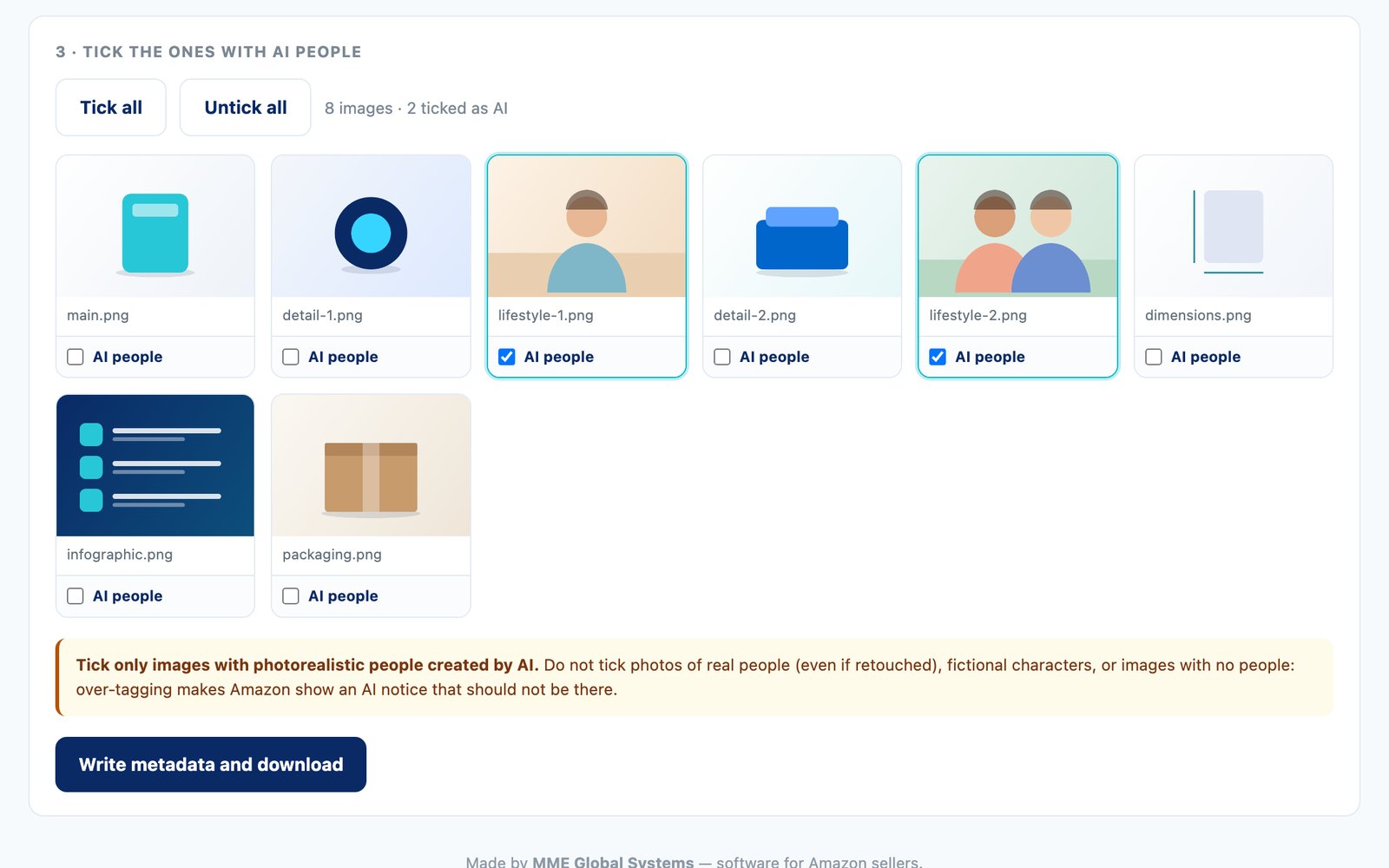
You download a small file, unzip it and open it with a double click. Drop in your images, tick the ones with AI people and download them ready to use. Your photos aren’t uploaded anywhere: everything happens in your browser, offline.
- Opens with a double click, nothing to install
- PNG and JPG, up to 100 at once
- Or use it without downloading, from our Website
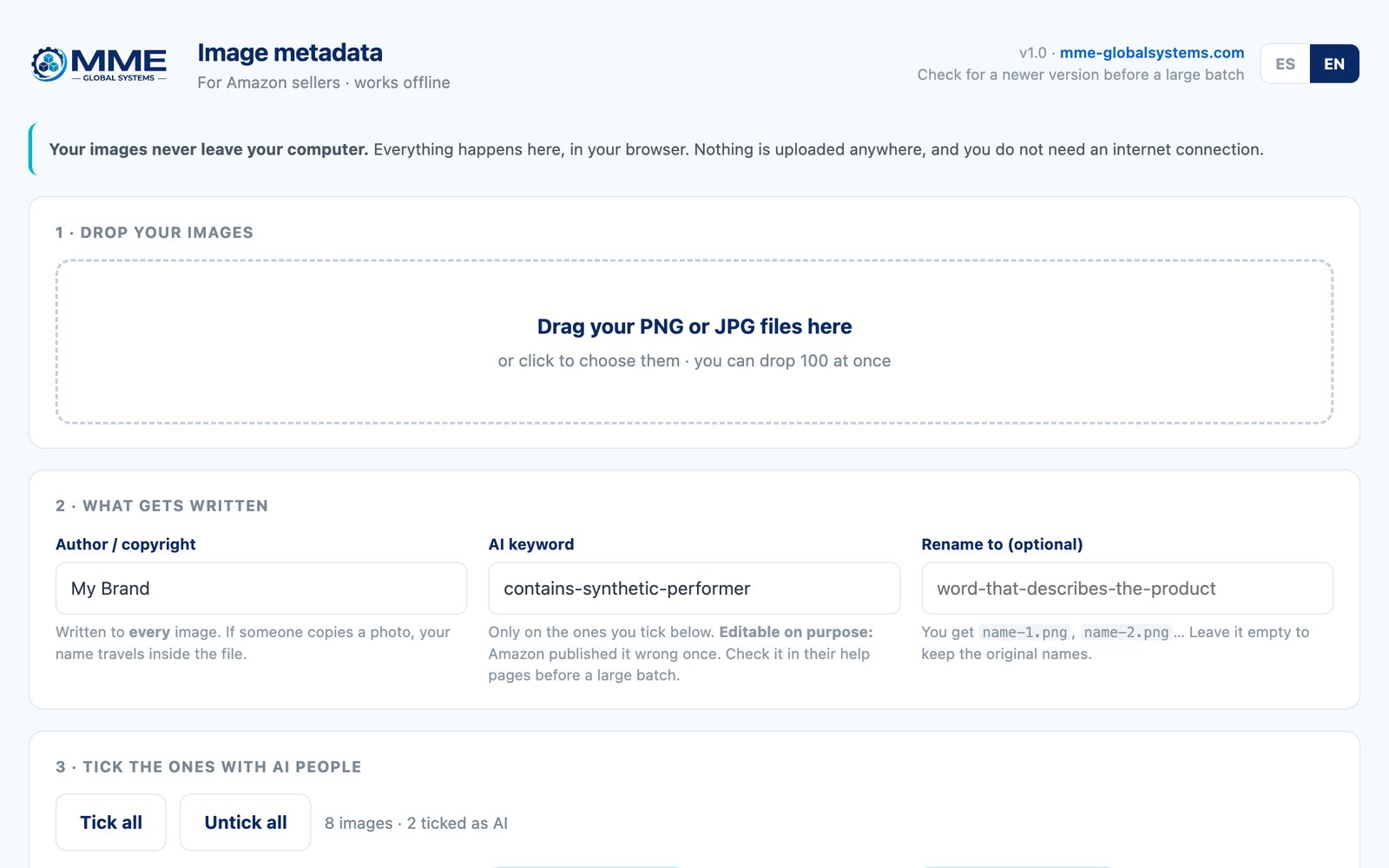
Adds Amazon’s word
Only on the images you tick. And you can change it, in case Amazon corrects it.
Your brand inside every photo
Author and copyright on all of them: if someone copies an image, your name travels with it.
Removes the location
Deletes the GPS data that photos sometimes store.
No loss of quality
It doesn’t recompress the image: it only writes inside the file.
Renames them if you want
All with the name you choose: product-1.png, product-2.png…
In Spanish and English
Switch the language with a button, top right.
It’s that easy
How to use it
1
Drop in your images
Drag your PNG or JPG files into the tool. You can drop 100 at once.
2
Tick the ones with AI people
Only those will get Amazon’s word. Your brand, as the author, goes on all of them.
3
Download the ZIP
You get them all back ready, without the location and, if you like, with a new name.
For Amazon sellers
More things that save you time
Made by people who sell on Amazon with their own brands.
Tools
The ones we use every day to research products, keep an eye on prices and host Websites. And a discount code for SoldScope.
MME ERP
Supplier purchases, stock, FBA shipments, settlements and expenses. And with Premium, what you really earn on each product.
From €29 a month + VAT
Frequently asked questions
What is “contains-synthetic-performer”?
It’s the word Amazon asks for so it knows that an image shows a photorealistic person created with artificial intelligence. It’s hidden inside the file: you can’t see it in the photo.
Where exactly does it go?
In the image’s metadata, in the keywords field (technically, “dc:subject” in the XMP block). You can add it with any metadata editor, or with our tool, which does all your images at once.
What happens if I label an image that doesn’t need it?
Amazon will show an AI notice on an image that shouldn’t have one. That’s why you should only tick the ones with photorealistic people created by AI.
What if only a pair of hands shows in the photo?
You still label it: it counts as a photorealistic person even if you can’t see their face.
Are my photos uploaded anywhere?
No. The tool runs inside your browser and doesn’t even need an internet connection. Your images never leave your computer.
Does the image lose quality?
No. The tool doesn’t recompress the photo: it only writes the information inside the file, so the image stays exactly the same.
Which formats does it support?
PNG and JPG. You can drop up to 100 images at once.
How do I check it’s been written?
On a Mac, open “Get Info” for the image in the Finder: you’ll see contains-synthetic-performer in the keywords.
What if Amazon changes the word?
You can change the word in the tool. Before a big batch, check it in Amazon’s help pages: they once published it with a typo.
Is it really free?
Yes, and there’s no sign-up. We built it for our own brands and we’re sharing it.
Get your images ready for Amazon in a minute
Free, no sign-up and without uploading your photos anywhere.